Basics of Using PRISM
Entering Searches
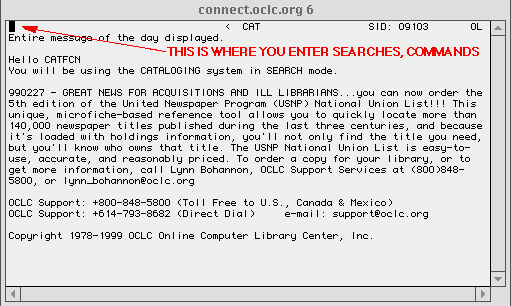
The blank space in the upper left-hand corner of the screen is the
HOME POSITION
.
This is where you type in commands and searches.
You then send the commands and searches to the computer by use of the
<Control> C
,
also abbreviated as
<^C>
.
If the
<^C>
does not work, you may have to use the
<f11>
function key to execute a command from the
Home Postion
.
Occasionally, the PRISM software will respond to your actions by indicating that a command must be entered using the
<f10>
function key.
To:
LT65 INDEX
To:
GREENSHEET
To:
To:
TOP OF PAGE:
So many urls. So little time.
T
M
(c) 1996-2003
- optimized for Netscape & 800x600 display