Find a Single Case by
Citation Number
Introduction
- Often you need information for
a specific case. If you have the citation number, it is relatively
straightforward.
- Judicial decisions or
"opinions" in federal appeals and Supreme courts as well as
regional, state, and specialized courts are published in a series
of volumes called "reports" or, more commonly, "reporters." In
these reporters, the individual cases are identified by the volume
number, the abbreviation for the reporter's name, and the page
number. Example: 410
U.S. 959
- I want to emphasize
this: You
need to know in which court a decision is likely to have been made
as well as the format of the citation in the appropriate
reporter(s) for that court. See
the page on
"Abbreviations
for Legislation & Court
Reporters" for
examples.
Process of
Finding a Case by Citation Number
- Click on Get a Document
at the top of the screen.
- In the red bar right below
"Get a Document" you select what type of information you
are going to enter. In this case it is the Citation. Again,
be sure that you have the correct number and format and know
which courts to search.
- When entering the citation
number:
- You do not have to
capitalize.
- You can omit periods, but
you must input the spaces where the periods would have been.
- Example:
- In the below, I've entered
410
U.S. 959, a citation
number for a case that had been before the US Supreme Court.
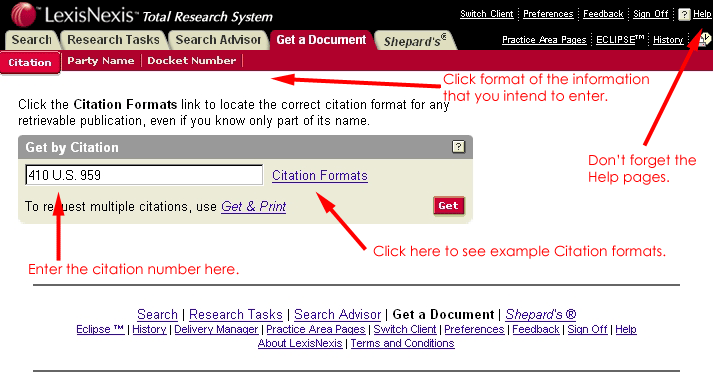
- Click on Get.
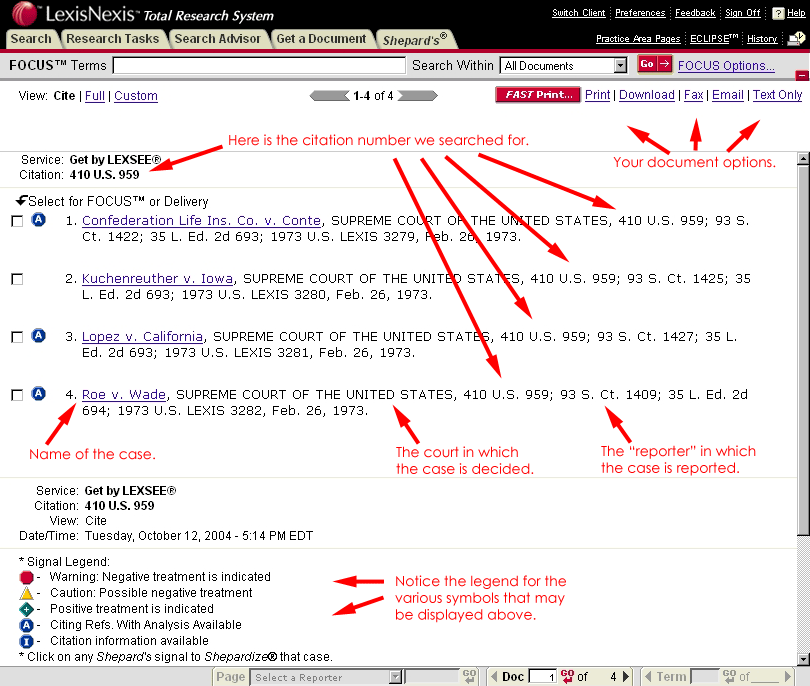
- Lexis retrieves the
following: